











Hello!

Microsoft Teams Phone

Keep all communication in one place.
Add high-quality calling capabilities to Microsoft Teams.
onductiT helps you replace your current phone system!

availability
0 %
phone system users
0 million
Fortune 500
0 %

What is Teams Phone?

Make and receive phone calls from any location with any device, within Microsoft Teams

We complete Teams by equipping it with high-quality calling features to and from the public telephone network, directly from the Teams application. This includes your own 088, 010, 020, etc., numbers, as well as all your international phone numbers.

Teams Phone gives you the functionality of a traditional Private Branch Exchange (PBX) with features like call hold, transferring, call forwarding, and voicemail, all from the Microsoft cloud, but without a traditional PBX.

It works simply over the internet, requiring no VPN or extra network equipment, while providing the super secure and reliable experience you expect from Microsoft.

Why Organizations Choose Teams Phone

Unified Collaboration

Teams allows you to consolidate all technology, tools, and voice solutions in one place.

Ready for Modern Employees

Increase your employees' productivity with a true collaboration hub, accessible from any device, whether at home, in the office, or on the go.

Future-Proof and Worry-Free

Teams Phone is flexible and easy to set up, scale, use, manage, and secure.

Worldwide Availability

With international numbers

One phone subscription, even if your staff works and makes calls in the Netherlands, Germany, Italy, or even on another continent. We've created the capability to offer Teams Phone worldwide in the same way, under consistent conditions.

  • Less administration – within the same Microsoft 365 tenant.
  • One telecom provider – for all countries where your organization operates.
  • Simplified invoicing – invoicing for all services in all countries on a single bill.
  • Dutch or English point of contact.
  • Available in 142 countries via Operator Connect or a Direct Routing connection, all managed and delivered by KonductiT.

Who we partner With

Teams Phone - Abonnementen

Bel via Teams met je vaste telefoonnummer(s).

Kostenloos op- en afschalen!

Hieronder vind je alle informatie over onze abonnementen. Kies het abonnement dat het beste bij je past. Of we gaan samen voor maatwerk! Voor organisaties van 10 to 1000+ medewerkers. Zorg, overheid, MKB of Multi-National, het maakt ons niet uit. Heb je hulp nodig bij het kiezen? Wil je meer informatie over onze oplossingen en prijzen of wil je een vergelijk met je huidige oplossing? Neem dan vrijblijvend contact met ons op of kijk verder op deze pagina en bekijk onze diensten.

Startup

Nieuw bedrijf?

€3,82

per gebruiker/maand*

Nieuwe nummers 088, 020, 010 etc.
Bestaande nummers wij porteren voor u
Nieuwe SIP bij een provider die u kiest
Intern gratis bellen tussen collega’s
Koppeling met Teams op elk apparaat
Internationaal 142 landen -optie
Voicemail via Teams
SLA Bel ons en niet Microsoft
Adoption wij helpen u
Uitrol binnen 2 dagen na opdracht.

Internationaal

Vestigingen in andere landen?

€4,45

per gebruiker/maand*

Internationaal nummers voor 142 landen
Bestaande nummers wij porteren voor u
Nieuwe nummers 088, 020, 010 etc. -optie
Nieuwe SIP bij een provider die u kiest
Intern gratis bellen tussen collega’s
Koppeling met Teams op elk apparaat
Voicemail via Teams
SLA Bel ons en niet Microsoft
Adoption wij helpen u
Uitrol binnen 1 dag na porteringsdatum

Eigen SIP

Waarom wachten?

€5,49

per gebruiker/maand*

Bestaande nummers geen portering nodig
Nieuwe nummers 088, 020, 010 etc. -optie
Bestaande SIP met uw  huidige belcontract
Koppeling met Teams op elk apparaat
Internationaal 142 landen -optie
Voicemail via Teams
SLA Bel ons en niet Microsoft
Adoption wij helpen u

Uitrol binnen 1 dag na SIP trunk verhuizing

* €3,82, €4,45 en  €5,49 zijn vanaf prijzen, exclusief Microsoft licenties, éénmalige- en belkosten / flatfee prijs. Minimale contract periode is 1 jaar daarna per maand opzegbaar.

Autoriteit
Consument & Markt

KonductiT BV is a registered provider of public electronic communication services. Its registration number with the Authority for Consumers and Markets (ACM) is 182609. KonductiT complies with all obligations under the Telecommunications Act regarding the provision of its services.

Your organization already has Microsoft E5 licenses?
That's fantastic news!

Then you already have Teams Phone licenses, and all you need are phone numbers and a connection to the telephone network.
We can arrange that simply and quickly for your organization.

Teams Phone

A live demo?

We'd be happy to visit you,
or simply remotely via Teams.

Advanced Features

Easy to Use

Today's organizations need a modern workplace that is productive, flexible, and mobile. Don't limit yourself with your existing traditional phone system; switch to a more flexible solution.

  • Call Recording / Transcription – Record calls and have Teams automatically convert speech to text, making it easy to search through conversations later.
  • Easily add someone to a call using your mouse. You can also patch someone on their mobile into a Teams-to-Teams call.
  • Call Center Queues – Let customers call a general number, and a group of employees can handle the call. This is ideal for helpdesk or reception functions.
  • Group & Individual Voicemail via email.

Full List:

Loved by IT

Self-Managed

Because Teams Phone is fully integrated within Teams, it can be easily managed by the IT department. This also keeps costs low!

  • When making changes, you don't need to rely on a telecom partner. We're here to answer your questions.
  • No complicated management interface or specialized knowledge is needed, unlike with a traditional phone system.
  • Phone configuration is integrated within the Teams Admin portal, a familiar interface for the IT department.
  • Phone numbers can be easily assigned to employees, even without our help!
  • KonductiT also assists with adoption for IT employees.

Teams Contact Center

Connecting with your customers using Teams

An in-cloud phone system via Microsoft Teams Phone makes it possible to manage the phone system yourself within Office 365 without complicated tooling. We see that Teams Phone is currently the first choice when selecting a replacement for a traditional phone system.

One of the most complex questions when switching to Phone System is what to do with the Contact Center?

The KonductiT team has been involved with Microsoft's cloud telephony from the very beginning. Because of this, we can offer you objective advice on all aspects of Teams Phone, including implementation, migration, adoption, and Contact Centers.
 

The Hybrid Workplace

Teams Phone

Teams Phone is the perfect phone system for the new normal.
Reach your business number from any location, on any device.

Teams Phone Mobile

New!

For More Efficient Collaboration: Integrate Your Mobile Number into Microsoft Teams

Many companies don't want to use their smartphone separately from their collaboration tools. With Teams Phone Mobile, you can now link your mobile 06 number directly to Microsoft Teams, making calling and collaboration even more efficient. No more hassle with multiple apps or devices—just one solution for all your business communication. Manage calls, easily switch between conversations, and work smarter, wherever you are. Experience the power of a fully integrated mobile workplace and make hybrid work effortless.

For more information about our Cloud Voice with Microsoft Teams Phone Mobile, or if you'd like to be an early adopter before the official launch, please contact us.

Teams Certified Devices

Microsoft Teams-certified devices are peripherals such as headsets, webcams, and speakers that have received a Microsoft certification. This certification guarantees that the devices meet specific quality and performance requirements, work without extra configuration, and are plug-and-play. You can order these devices along with Teams Phone directly from KonductiT.

Teams Phones

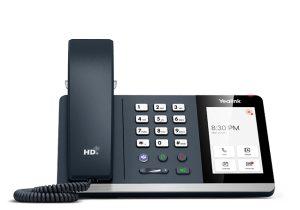
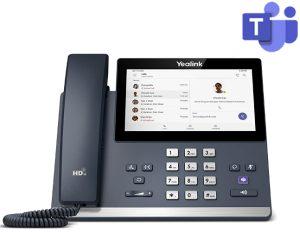
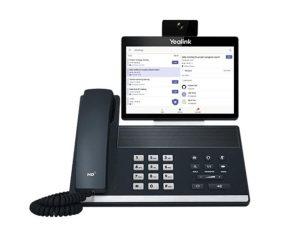
A Teams phone is a desk phone that runs the Microsoft Teams app, giving it far more useful features than a traditional desk phone. The device is plug-and-play, meaning you can use it anywhere there's internet, including at home! You also log in easily with your Windows username, just like on your smartphone. On the touchscreen, you'll find familiar Teams features, such as inviting colleagues to a meeting or managing your calendar. There are even models available with a camera.

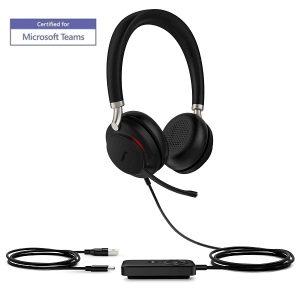
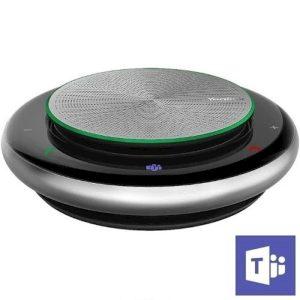
Teams Headsets and Speakerphones

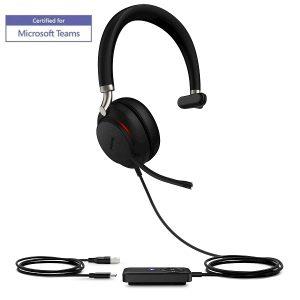
Are you currently using or planning to switch to Microsoft Teams? A specialized Teams headset completes your workspace. This combination ensures seamless integration with the Teams platform, providing great ease of use and excellent sound quality for both you and your listeners. Speakerphones are suitable for 1-2 people in a conference call. They're ideal for meetings, personal use in private spaces, and on the go. It's nice to not always have a headset on!

Intercom with Video

Connect an Existing SIP Intercom with Team

We offer a solution to integrate your existing video door intercom system with Teams. This allows you to manage intercom calls directly through your Microsoft Teams environment.

  • Our solution provides a complete software integration, meaning you won't need any new cables or an SBC (Session Border Controller).
  • Intercom calls can be answered directly within Teams, including video!
  • Intercom calls are received on PC, smartphone, or even desk phone — anywhere the Teams app is available.
  • You can route intercom calls to a group of people or to an alternative destination outside of office hours, ensuring no intercom call goes unanswered!
  • We support virtually all intercom brands, offering a flexible and comprehensive solution.

Learn More About:

Complete Phone System,
Powered by Microsoft Teams

Now Available Worldwide

Making and Receiving Calls

Work smarter with an all-in-one app that brings together calling, chat, meetings, and collaboration. Always use local phone numbers and help employees separate work and personal life.

Easy setup and management

Monitor and manage telephony yourself from the familiar Teams Admin Center or via the KonductiT portal. No investment in hardware required.

Manage telephony with ease

Retain control with do not disturb, name/number display, voicemail, and delegation. Easily add voice and video calls.

Local support

Skip Microsoft Support wait times with direct support from KonductiT.

Frequently Asked Questions

Microsoft Teams natively offers a good set of call center features, such as call queues, auto attendants (voice menus), reporting, and shared voicemail:

  • Auto Attendant: Callers get a numerical or voice menu that connects them to the right person to help with their query.
  • Call Queue: Callers are held in a queue until a relevant agent is available to answer their question; music or messages can be played.
  • Call Reporting: Includes analysis of auto attendant, queue performance, and agent timelines.

Microsoft Teams supports a portfolio of desk phones, including those from Yealink, Crestron, Lenovo, Poly, and AudioCodes. Until recently, only Teams-certified phones worked with Microsoft Teams, but now you can also use older devices from other phone systems with Teams. TeamsPhone.nl is happy to advise you on the different possibilities, without obligation.

Yes, you can use a SIP trunk with Microsoft Teams, but Microsoft doesn't provide the SIP trunk directly. We at TeamsPhone.nl are experts in SIP Trunking. TeamsPhone.nl can provide you with national or international SIP trunks and connect them to your existing Microsoft Teams licenses. If you still have a SIP trunk under contract with your current supplier, that's not a problem—we can connect that one too! TeamsPhone.nl integrates SIP with Microsoft Teams to maximize your network's flexibility and connectivity, offering you enterprise-level voice communication with all the collaboration features you enjoy from Microsoft Teams. 

Our experience is that the call quality of a Teams call is often better than that of a landline. You'll also be asked to rate the call quality after a conversation, so any issues can be resolved if the quality isn't what you expect. When you partner with TeamsPhone.nl for your business Teams phone installation, we'll have support address any call quality issues as soon as a ticket is submitted.

Yes. Calling with Teams gives you many customization options when it comes to numbers.

No, you don't have to change your numbers. You can transfer your existing numbers to Teams, or you can get a new number through us. Porting your numbers can take anywhere between 5 and 30 days, depending on your current phone provider. We can work directly with your provider to make this transition as smooth and fast as possible.

Yes. One of the advantages of Teams Phone is that you can adjust the settings to ring both desktop and mobile devices. Teams Phone is easy to operate using the Teams app on your smartphone.

When Teams Phone is enabled, you can forward your business number to your mobile phone or another person, transfer calls to someone else in your organization, and even have your voicemail messages sent to your email.

No, Mac users will have the same experience with Teams Phone as PC users. Users can use a web browser or the Teams app for Mac.

Users must have the Microsoft Phone System license in combination with a supported Microsoft subscription, including:

  • Microsoft 365 Business Basic, Standard of Premium
  • Microsoft 365 F1 of F3, Office 365 F3
  • Microsoft 365 and Office 365 Enterprise E1, E3 or E5
  • Microsoft 365 and Office 365 Education A1, A3, of A5
  • Microsoft 365 and Office 365 F1, F3, of F5 
  • Microsoft 365 Nonprofit Business Basic, Standard, E1, E3, of E5

Absolutely! 😀 If your question isn't listed here, please feel free to contact us. We'll be happy to answer it.

In Summary

With our Teams Phone solution, you can transform your Microsoft Teams into an advanced phone system, allowing everyone to make and receive calls from anywhere.

  • Answer Calls and Make Phone Calls Anywhere with Microsoft Teams.
  • Ideal for staff working from home who still need to take calls.
  • Works with Microsoft Teams on PC, Mac, mobile, and dedicated Teams phones.
  • 100% cloud with 99.99% availability, no hardware investments needed.
  • Integrated Enterprise-level security.
  • Call center features like interactive voice menus and call groups.
  • KonductiT can connect your organization.

Our Blog

Schedule an appointment with KonductiT today

Complete Microsoft Teams and Use Teams Phone
as Your Business Phone System

Teams Phone

We’ve seen two years’ worth of digital transformation in two months. From remote teamwork and learning, to sales and customer service, to critical cloud infrastructure and security—we are working alongside customers every day to help them adapt and stay open for business in a world of remote everything.